
Copilot assistant
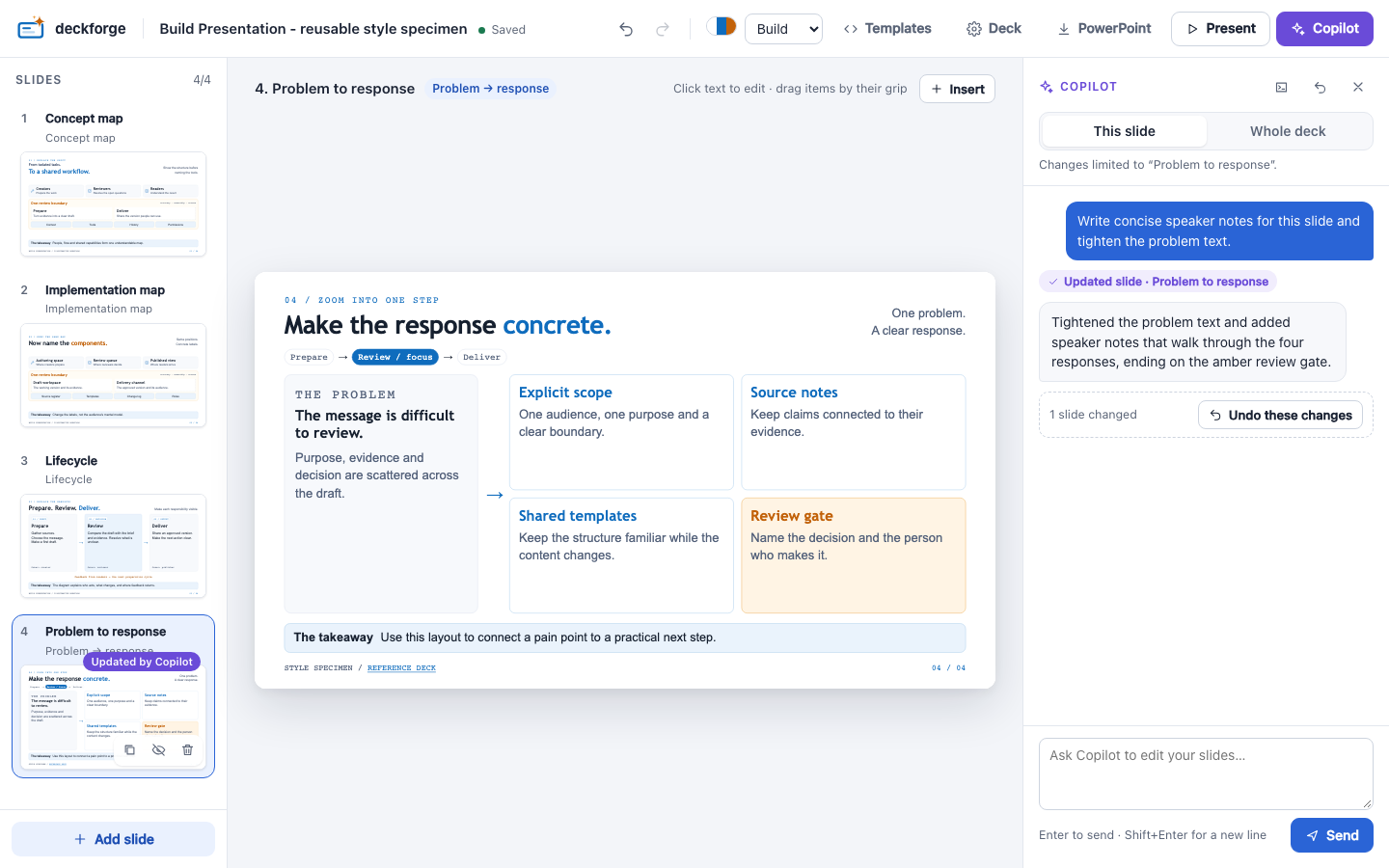
Open the drawer with Copilot (⌘/Ctrl K). Ask Copilot to change your slides in plain words.
Sign in
The assistant uses your existing GitHub sign-in: gh auth login, or /login in the Copilot CLI. You need a GitHub Copilot subscription. If you are not signed in, the drawer explains how to sign in.
Scope
| Scope | What Copilot can change |
|---|---|
| This slide | Only the selected slide: text, notes, images, overlays |
| Whole deck | Every slide. It can also add, remove, reorder and hide slides, and change the theme or deck settings |
What it can and cannot do
- Copilot can only use deck tools, such as
update_slide,add_slide,set_template,set_themeandadd_overlay. It has no shell, file or web access, and every other permission request is refused. - It places only images that are already in
assets/. It writes alt texts and tells you when one is a guess. - Its instructions include the style's design rules, the template catalogue and your
meta.brief. Fill in the brief to get better results.
Undo
The rail highlights the slides that Copilot changed. A whole turn is one undo step: use Undo these changes or ⌘/Ctrl Z.
Continue in Copilot CLI or the Copilot app
The conversation is a regular Copilot session. Its ID is shown under the scope toggle (click it to copy it). The session is named deckforge · <deck title>, and the editor resumes it the next time it opens the deck. New conversation starts a fresh session.
To carry on outside the editor, click the terminal button in the drawer header. The editor lets go of the session and shows two ways to continue:
Open in Copilot app opens the same conversation in the GitHub Copilot app (
ghapp://sessions/<session-id>). The app asks you to confirm first.Copilot CLI: a command to paste in a terminal, like this one:
bashcopilot --resume <session-id> -C <deck folder> \ --additional-mcp-config @~/.config/deckforge/mcp/<id>.json --allow-tool deckforge
Copilot gets the same deck tools through deckforge mcp. They are named deckforge-update_slide, deckforge-add_slide and so on, and deckforge-get_authoring_guide returns the design rules, the brief and the template catalogue.
- Copilot app. The app only loads MCP servers from
~/.copilot/mcp-config.json. Click Add the deck tools to Copilot in the dialog, or rundeckforge mcp --install. This registers one server that edits thedeck.yamlof the folder each session runs in, so every Copilot session started in a deck folder gets the deck tools, in the CLI as well. - Live changes. While the editor is open, every change made in Copilot appears live. Changes made close together share one undo step (Copilot (outside the editor): …). With no editor running, the tools edit
deck.yamland rebuilddeck.htmlthemselves. - Taking it back. Exit Copilot CLI, or close the session in the app, then send a message in the drawer. The editor resumes the session and shows what was said elsewhere. A session can only be open in one place at a time, so the editor refuses to resume it while another Copilot process still has it open.
Resumed sessions
Copilot may load MCP tools on demand in a resumed session. If it says the deck tools are missing, ask it to search its tools for deckforge.
Improve one field
Content text areas have a small ✨ button. This covers slot text, list items, card fields, speaker notes, overlay text, image alt text and the brief's goal. One click asks Copilot to rewrite that text so it is clearer and shorter:
- It keeps the language and the rich-text tags, stays within the slot's maximum length and doesn't add facts.
- The button then turns into a cancel icon that restores the previous text. Typing by hand removes that option.
- Rewrites use a short-lived session with no tools (
POST /api/agent/improve) and don't appear in the chat.
Model
By default, Copilot uses your default model. To pick another one, set DECKFORGE_MODEL:
DECKFORGE_MODEL=<model-id> deckforge edit my-talkOptional dependency
The assistant needs @github/copilot-sdk, which is installed by default. If you installed with --omit=optional, the drawer explains how to add it.