
Agent model
deckforge is built so that an AI agent can edit a presentation safely and you can check what it did. This page describes that contract: the tools the agent can call, the scope rules, the undo semantics, what the agent can never do, how it is grounded on your brief, and the security boundaries around it. It applies to the Copilot assistant in the editor and to agents that use deckforge mcp.
The loop
- Structured source.
deck.yamlis the only source of truth. Each slide picks a template and fills its typed slots (text,richtext,list,cards,image…), so a change is a readable diff. See deck.yaml. - Typed tools only. The agent changes the deck by calling deck tools such as
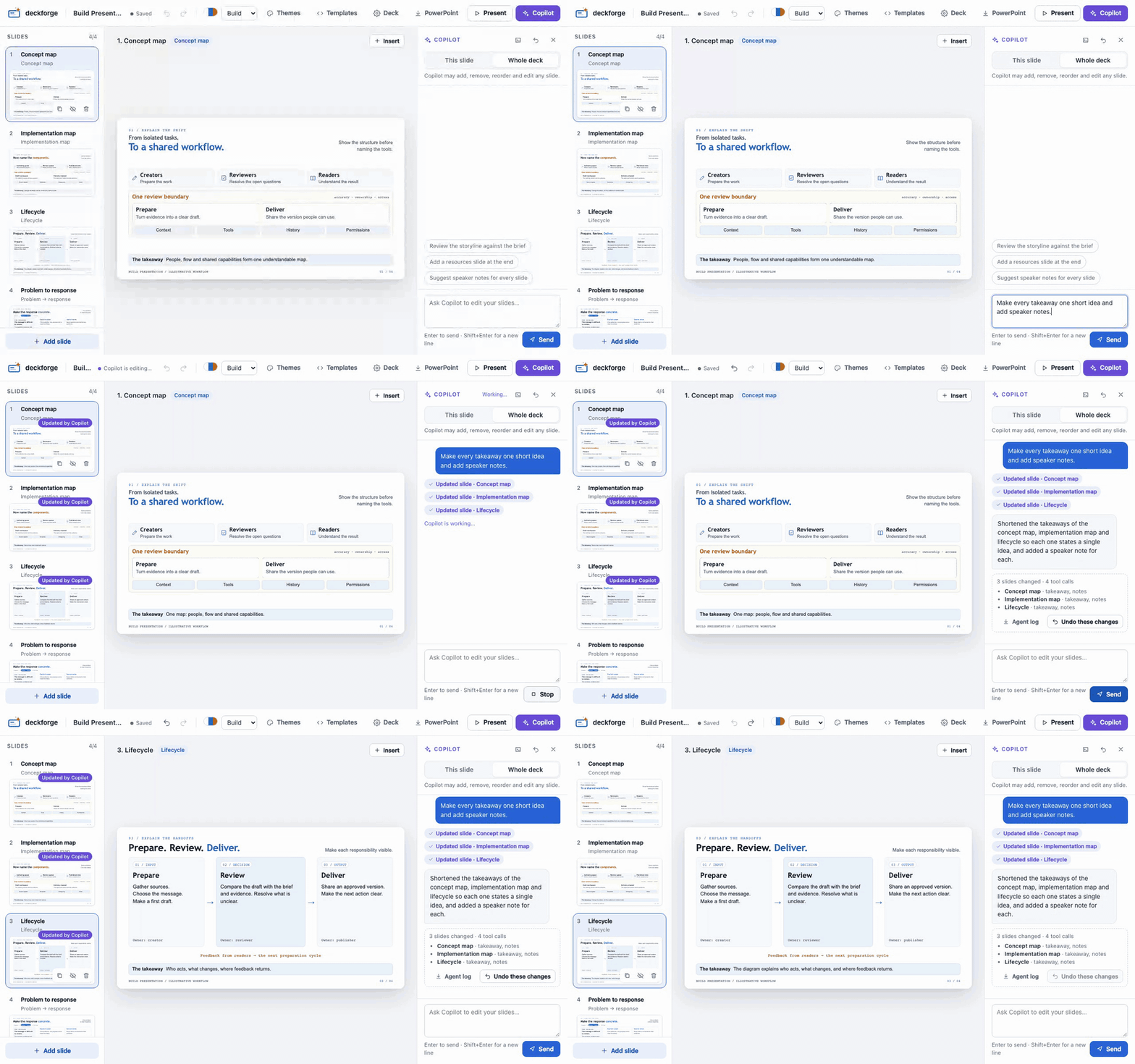
update_slide,set_templateandadd_overlay. Each call is validated against the templates and themes before it is applied. - Reversible turns. One request to Copilot is one undo step. The rail highlights the slides it changed and the drawer lists the slides and slots it touched.
- Audit. Download the agent log, a JSON file with every tool call of every turn, and review it next to the
deck.yamldiff.
Tool catalogue
The tables below are generated from the tool definitions in src/server/deck-tools.js (npm run docs:tools), and a test fails when they drift. Read tools work in every scope. Tools that change the deck are listed with the scope that allows them.
| Tool | Changes the deck | Allowed in This slide scope | Editor chat | deckforge mcp |
|---|---|---|---|---|
get_authoring_guide | – | – | – | ✓ |
get_deck | – | ✓ | ✓ | ✓ |
list_templates | – | ✓ | ✓ | ✓ |
list_themes | – | ✓ | ✓ | ✓ |
update_slide | ✓ | ✓ | ✓ | ✓ |
add_slide | ✓ | – | ✓ | ✓ |
remove_slide | ✓ | – | ✓ | ✓ |
move_slide | ✓ | – | ✓ | ✓ |
set_hidden | ✓ | ✓ | ✓ | ✓ |
set_template | ✓ | ✓ | ✓ | ✓ |
set_theme | ✓ | – | ✓ | ✓ |
list_assets | – | ✓ | ✓ | ✓ |
set_image | ✓ | ✓ | ✓ | ✓ |
add_overlay | ✓ | ✓ | ✓ | ✓ |
update_overlay | ✓ | ✓ | ✓ | ✓ |
remove_overlay | ✓ | ✓ | ✓ | ✓ |
update_meta | ✓ | – | ✓ | ✓ |
get_authoring_guide
Return the deckforge authoring guide for this deck: how to use these tools, design rules, the deck brief and the template catalogue (slots). Call it once before editing.
No parameters.
get_deck
Return the full deck: meta (title, lang, theme, footer, brief) and slides (id, template, hidden, title, data, notes) in order.
No parameters.
list_templates
List available slide templates with their description and slot schema (type, max, fields).
No parameters.
list_themes
List available themes (name, label, description).
No parameters.
update_slide
Update one slide. data merges top-level slot values (null deletes a slot). set assigns values by dotted path, e.g. {"cards.0.title": "New"}. Also updates notes, nav title or footer override.
| Parameter | Type | Required | Description |
|---|---|---|---|
id | string | ✓ | Slide id |
data | object | – | Slot values to merge |
set | object | – | Dotted slot path → value |
notes | string | – | Speaker notes (replaces existing) |
title | string | – | Short title used in navigation (optional) |
footer | string | – | Footer override for this slide (richtext); empty string to clear |
add_slide
Insert a new slide using a template. Slots you do not provide show the template's sample text as editor-only placeholders (listed in the slide's placeholders, never published), so provide real data for every slot that should appear.
| Parameter | Type | Required | Description |
|---|---|---|---|
template | string | ✓ | |
data | object | – | |
notes | string | – | |
title | string | – | Short navigation title |
after | string | – | Insert after this slide id (default: end of deck) |
id | string | – | Optional explicit id (letters, digits, dashes) |
remove_slide
Delete a slide.
| Parameter | Type | Required | Description |
|---|---|---|---|
id | string | ✓ | Slide id |
move_slide
Move a slide to a new 0-based index, or after another slide (after: null moves it first).
| Parameter | Type | Required | Description |
|---|---|---|---|
id | string | ✓ | Slide id |
index | integer ≥ 0 | – | |
after | string or null | – |
set_hidden
Hide or show a slide (hidden slides are skipped in the presentation).
| Parameter | Type | Required | Description |
|---|---|---|---|
id | string | ✓ | Slide id |
hidden | boolean | ✓ |
set_template
Change a slide's template. Compatible slot values are kept; values the new template does not use are kept in the slide's stash and restored if it switches back. Provide data for new slots, otherwise they become editor-only sample placeholders.
| Parameter | Type | Required | Description |
|---|---|---|---|
id | string | ✓ | Slide id |
template | string | ✓ | |
data | object | – |
set_theme
Switch the deck theme.
| Parameter | Type | Required | Description |
|---|---|---|---|
theme | string | ✓ |
list_assets
List the image files already in the deck's assets/ folder (path, type, pixel size, slides using them). Only these files can be used; you cannot download images.
No parameters.
set_image
Put an image from assets/ into a slide's image slot (default: the template's first image slot). Always write a concise, descriptive alt text; when you cannot know what the image shows, derive it from the file name/slide context and tell the user it is a suggestion to check.
| Parameter | Type | Required | Description |
|---|---|---|---|
id | string | ✓ | Slide id |
path | string | ✓ | Asset path from list_assets, e.g. assets/1a2b3c4d5e6f.png |
alt | string | ✓ | Alternative text (what the image shows, for screen readers) |
fit | cover, contain | – | cover crops to fill the frame, contain shows the whole image |
focus | string | – | Focal point kept visible when cropping, "x% y%" (default "50% 50%") |
slot | string | – | Image slot name (optional) |
add_overlay
Add a freely positioned element above a slide's template (image, text, callout, arrow, shape). Geometry is in % of the 1280×720 slide. Keep overlays inside the slide and off the template's text. Prefer template slots; use overlays for annotations (arrows, callouts) and extra pictures.
| Parameter | Type | Required | Description |
|---|---|---|---|
id | string | ✓ | Slide id |
kind | image, text, callout, arrow, shape | ✓ | |
x | number | ✓ | Left edge, % of the slide width (0–100) |
y | number | ✓ | Top edge, % of the slide height (0–100) |
w | number | ✓ | Width, % of the slide width |
h | number | ✓ | Height, % of the slide height |
z | integer | – | Stacking order among overlays (higher is in front) |
rotate | number | – | Rotation in degrees (0 to clear) |
order | integer or null | – | Reveal step (0 = with the first template element); omit to reveal after the template, null to clear |
data | object | – | Kind-specific fields, theme tokens only. text: {text (richtext), style: body|heading|title|caption|label, align: left|center|right, color: ink|muted|primary|accent}. callout: {text, tone: primary|accent|neutral, align}. arrow: {color: primary|accent|ink|muted, head: end|start|both|none, weight: thin|regular|bold, line: solid|dashed} (points right; use rotate). shape: {shape: rounded|rect|ellipse|pill, fill: primary|accent|neutral|paper|none, stroke: primary|accent|line|dashed|none}. image: {src: "assets/…" from list_assets, alt (required), fit: cover|contain, focus: "x% y%"}. |
update_overlay
Move, resize or edit an overlay. Only the given properties change; data fields are merged.
| Parameter | Type | Required | Description |
|---|---|---|---|
id | string | ✓ | Slide id |
overlayId | string | ✓ | |
x | number | – | Left edge, % of the slide width (0–100) |
y | number | – | Top edge, % of the slide height (0–100) |
w | number | – | Width, % of the slide width |
h | number | – | Height, % of the slide height |
z | integer | – | Stacking order among overlays (higher is in front) |
rotate | number | – | Rotation in degrees (0 to clear) |
order | integer or null | – | Reveal step (0 = with the first template element); omit to reveal after the template, null to clear |
data | object | – | Kind-specific fields, theme tokens only. text: {text (richtext), style: body|heading|title|caption|label, align: left|center|right, color: ink|muted|primary|accent}. callout: {text, tone: primary|accent|neutral, align}. arrow: {color: primary|accent|ink|muted, head: end|start|both|none, weight: thin|regular|bold, line: solid|dashed} (points right; use rotate). shape: {shape: rounded|rect|ellipse|pill, fill: primary|accent|neutral|paper|none, stroke: primary|accent|line|dashed|none}. image: {src: "assets/…" from list_assets, alt (required), fit: cover|contain, focus: "x% y%"}. |
remove_overlay
Delete an overlay from a slide.
| Parameter | Type | Required | Description |
|---|---|---|---|
id | string | ✓ | Slide id |
overlayId | string | ✓ |
update_meta
Update deck metadata: title, subtitle, author, date, footer, description, lang, and brief {topic, audience, goal, sources[], duration}.
| Parameter | Type | Required | Description |
|---|---|---|---|
meta | object | ✓ |
Scope rules
The drawer has two scopes. The editor adds the scope to each message, and the server enforces it on every tool call:
| Scope | Allowed changes | Refused |
|---|---|---|
| This slide | update_slide, set_template, set_hidden, set_image, add_overlay, update_overlay and remove_overlay, only with the selected slide's id | Any other slide (Out of scope), and add_slide, remove_slide, move_slide, set_theme and update_meta (not allowed) |
| Whole deck | Every tool | Nothing |
A refused call changes nothing. The agent gets an error message and the drawer shows it as a red tool chip. Read tools (get_deck, list_templates, list_themes, list_assets) are always allowed. In slide scope, get_deck also returns scope: "this slide" and the slide's id.
Agents that use deckforge mcp have no scope: they work on the whole deck, like the Whole deck scope.
Undo semantics
- One turn, one undo step. The editor opens an undo group when Copilot starts a turn and closes it when the turn ends, even on an error, a timeout (5 minutes) or Stop. The step is named
Agent: <your request>. - Undo these changes, under the turn summary, or ⌘/Ctrl Z reverts the whole turn. Redo brings it back.
- No mixed steps. While a turn runs, your own edits, uploads, undo and redo are refused, so a turn's undo step only contains Copilot's changes. Changes from
deckforge mcpare refused too. - No empty steps. A turn that changes nothing adds no undo step. A tool call that writes the current value is ignored.
- Outside the editor. Changes from
deckforge mcpwhile the editor is open are namedCopilot (outside the editor): <tool>. Calls less than 30 seconds apart share one undo step. - The editor keeps the last 200 undo steps.
Change summary and agent log
After each turn, the drawer shows a summary:
- the number of slides changed and of tool calls made, with the number of failed calls;
- each changed slide, with the slots and fields the agent wrote (for example
eyebrow, cards.0.title, notes), and the deck settings it changed (theme,meta.brief…); - Undo these changes and Agent log.
Agent log downloads <deck>.agent-log.json, with one entry per turn since the editor started:
{
  "deck": { "title": "Shipping with confidence", "file": "deck.yaml" },
  "exportedAt": "2026-10-02T18:30:00.000Z",
  "turns": [
    {
      "turn": 1,
      "startedAt": "2026-10-02T18:29:41.120Z",
      "endedAt": "2026-10-02T18:29:52.418Z",
      "sessionId": "…",
      "prompt": "Tighten the copy on this slide",
      "scope": "slide",
      "slideId": "zoom",
      "calls": [
        { "tool": "get_deck", "args": {}, "ok": true, "slideId": null, "fields": [] },
        { "tool": "update_slide", "args": { "id": "zoom", "set": { "eyebrow": "04 / Zoom in" } }, "ok": true, "slideId": "zoom", "fields": ["eyebrow"] }
      ],
      "changed": ["zoom"],
      "summary": { "toolCalls": 2, "failed": 0, "slides": [{ "id": "zoom", "fields": ["eyebrow"] }], "deck": [] },
      "reply": "I shortened the eyebrow…",
      "error": null
    }
  ]
}
Each call has an ISO at timestamp too. Failed and refused calls have "ok": false and an error. The log stays in memory: it is never written to disk unless you download it, and it is cleared when the editor stops. It covers the editor's Copilot turns. Use git diff deck.yaml to review changes made through deckforge mcp.
What the agent can never do
- Run anything else. The Copilot session only has the deck tools. It has no shell, file, web or code tools, and every other permission request is refused.
- Change files directly. It cannot write
deck.yaml,deck.html, templates, themes or any other file. Tools change the deck in memory, and the editor validates and saves it. - Fetch content. It cannot download, search or generate images. It can only place files that are already in the deck's
assets/folder: any other image path is refused. - Act outside a request. Tool calls are refused when no turn is running.
- Leave its scope. In This slide scope it can only change the selected slide.
- Bypass validation. Every change goes through the same operations as your own edits. Unknown templates, themes, overlay properties and deck settings are refused. After each change the deck is rebuilt and checked against its templates: unknown slots and text over a slot's maximum are reported as issues, and rich text is sanitized when it is rendered.
The ✨ Improve buttons use a separate, short-lived session with no tools at all. It returns text, and the editor applies it.
Grounding on the brief
The agent's instructions include:
- the design rules (one idea per slide, short headlines, slot limits, no invented facts, metrics, dates or quotes);
- the template catalogue, with each slot's type, maximum length and description;
- the deck's
meta.brief(topic, audience, goal, sources, duration), with the title, language and theme.
The instructions are built when the conversation starts. If you change the brief, start a New conversation, or ask Copilot to read the deck again: get_deck always returns the current meta.brief. Agents that use deckforge mcp get the same rules, catalogue and brief from get_authoring_guide. See Write a deck for the brief fields.
Security boundaries
- The editor binds
127.0.0.1on a random port. Every request needs the per-run token, sent as a cookie by the browser and as a header bydeckforge mcp. - The server checks the Host header against DNS rebinding and the Origin header on every write. Writes need a JSON body.
- The agent runs on your GitHub Copilot sign-in, through the Copilot SDK. deckforge stores no API key and sends no telemetry.
deckforge mcpreaches a running editor through a private record (~/.config/deckforge/editors/<id>.json, mode 0600) and is refused while the editor's own Copilot turn runs.
The security model has the full list.
External agents
deckforge mcp gives any MCP client (Copilot CLI, the Copilot app, or another agent) the same typed tools, plus get_authoring_guide. With the editor open, each change appears live and can be undone. Without it, the tools edit deck.yaml and rebuild deck.html. See Continue in Copilot CLI or the Copilot app.
See it
- The animation at the top of this page: a whole-deck request, the highlighted slides and the turn summary, then one undo.
- Agent-native decks: this page as an 8-slide deck, written from a brief by the Copilot skill and checked by its validation report.